Sites live on GuardWatch
After go-live, your dashboard shows how many client sites are active — not a marketing estimate.
From your own account
For security companies staffing multiple client sites
Attendance, gate scanning, and client-ready reporting for every guard you deploy — whether they're covering a gated community, an office lobby, or several sites in the same week.
The problem
Every extra client site multiplies the same coordination problems — usually across WhatsApp groups and separate spreadsheets.
Supervisors juggle separate updates from each site instead of one live view.
Confirming who showed up where means chasing guards or site contacts individually.
Building a coverage report for a client means compiling notes from several sources.
Without checkpoint scans, a completed patrol is only as credible as a guard's word.
Built for every kind of client site
The same guard app and admin dashboard work whether the site is residential or commercial.
HOA-managed communities with resident-approved visitor passes and gate scanning.
See housing societiesMulti-tower properties where guards rotate across several lobbies and shifts.
See apartment communitiesLobby and reception coverage with visitor, vendor, and contractor accountability.
See commercial buildingsHow it works
Add client sites and assign guards to the ones they cover.
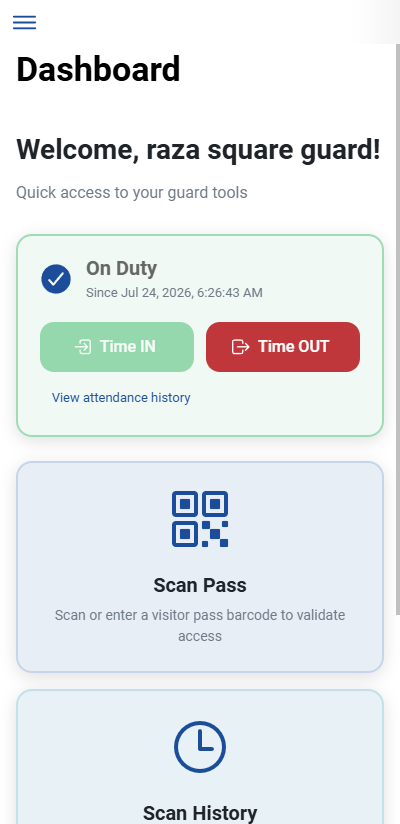
Time IN / Time OUT and visitor scans happen from the same mobile app.
Live status shows who is on duty where, without a phone call round-up.
Pull attendance and scan history for any site and share it directly with the client.
Inside GuardWatch
Supervisors open one dashboard to check attendance and gate activity across all assigned sites — instead of pinging each guard individually for a status update.
Operational visibility
Once you're live, these become real figures pulled from your own sites — not marketing stats.
After go-live, your dashboard shows how many client sites are active — not a marketing estimate.
From your own account
Attendance and scan activity for assigned guards rolls into one operator view across sites.
From your own account
Shift history becomes a report you can share with clients instead of rebuilding from chat logs.
From your own account
Why security companies choose GuardWatch
Site status lives in separate group chats and phone calls.
Attendance and scans from every assigned site roll into one admin view.
Supervisors stop chasing updates and start reviewing them.
Clients ask for proof of coverage you cannot produce quickly.
Time IN / Time OUT history is searchable by site and date range.
A coverage report is minutes away, not a re-compile job.
Replacing a guard usually means rebuilding site knowledge from zero.
New guards are simply reassigned to the site inside the dashboard.
Coverage continues without a records gap.
Community clients and your own admins need different visibility.
Community admins see their site; your admins see all assigned sites.
Everyone sees what is relevant, nothing more.
Gate scanning and attendance often live in separate tools.
Both run from the same guard app your staff already use.
One tool to train guards on, not two.
Adding a new client site is usually a slow setup process.
Register the site, assign guards, and it is ready for shifts.
New contracts start on GuardWatch from day one.
Questions operations managers ask before rolling GuardWatch out across client sites.
Yes. Security company admins see guards, attendance, and visitor scanning across every client site they staff — gated communities, offices, or other properties — from one dashboard instead of separate spreadsheets per client.
Guards clock Time IN and Time OUT from the mobile app at each site. Supervisors and client-facing admins can pull attendance history for a specific site and date range as proof of coverage.
No. GuardWatch focuses on attendance, visitor/gate scanning, and reporting for the sites you guard. It is designed to sit alongside your existing scheduling or payroll process, not replace it.
Security company admins can add or remove guards and reassign them to sites directly from the dashboard, so turnover does not mean re-building attendance records from scratch.
Yes, with the right scope. Community admins see activity for their own site; security company admins see their guards across all assigned sites. Access is scoped so each side sees what is relevant to them.
GuardWatch is built specifically for guarding operations — attendance is paired with visitor QR scanning and gate activity, not just a generic punch clock. That makes it more useful for client reporting than a standalone HR tool.