Illegible, incomplete logs
Rushed handwriting, skipped fields, and missing pages leave no reliable record of who actually entered.
For housing societies, apartments & gated communities
GuardWatch turns every gate entry into a QR visitor pass, a resident approval, and a permanent digital record — so nobody has to guess who's outside, and nobody has to decode a guard's handwriting later.
What it is
A visitor management system records, verifies, and stores every person who enters your property — replacing the handwritten book with a QR visitor pass system that guards can actually rely on.
Instead of a guest giving a name and a guard writing it down, a host — a resident, a front-desk officer, or a facility manager — creates a visitor pass ahead of time or the moment the guest arrives. GuardWatch generates a unique QR code carrying the guest's details, the host unit, and an approved time window.
At the gate, the guard scans that code instead of interrogating the guest or dialing a flat. The scan confirms the pass is real, checks it against the approval, and writes a timestamped entry to the digital visitor register automatically. Nothing depends on handwriting, memory, or a resident being reachable by phone.
For a closer look at how the QR codes themselves are generated and verified, see our QR visitor pass system page.
The exact workflow bends to fit where it's used. Housing society visitor management usually centers on residents approving guests for their own unit, with the committee reviewing gate activity across the whole property. Apartment visitor management often adds front-desk staff who create passes on a resident's behalf when a household is out. Standalone gated communities with a single main gate tend to lean on guard-side scanning and reporting more heavily, since one entry point sees most of the daily traffic. GuardWatch supports all three patterns from the same visitor pass system, so a property doesn't have to choose one rigid process on day one.
The problem
Manual visitor logging feels manageable until there's a queue, a dispute, or an audit — then the gaps show up all at once.
Rushed handwriting, skipped fields, and missing pages leave no reliable record of who actually entered.
Every unannounced guest means calling a unit that may not answer, backing up the queue behind them.
A name written on a page cannot confirm a visitor is who they claim to be, or that anyone approved them.
When a committee asks who visited a unit last month, the answer is buried in old notebooks — if it exists at all.
Before & after
Same visitor, same gate — a completely different level of accountability.
The old way — paper register
Guard has no advance notice of who is coming or why.
The line at the gate waits while a phone rings — or goes unanswered.
Approval happens by word of mouth, with nothing recorded.
A rushed, often illegible entry is the only record that exists.
The new way — GuardWatch
A visitor pass is created in the resident app before or as the guest arrives.
The pass is shared instantly over WhatsApp or SMS — no app needed for the guest.
The guard app confirms the guest, host unit, and approved time window.
The host gets a real-time alert the moment their guest is scanned in.
The visit is written to a searchable digital visitor register automatically.
Residents manage passes from the resident app; guards scan and log entries from the guard management tools — both on one GuardWatch account.
Step by step
Click through each stage of the visitor journey to see what happens on both sides of the gate.
Step 1 of 6
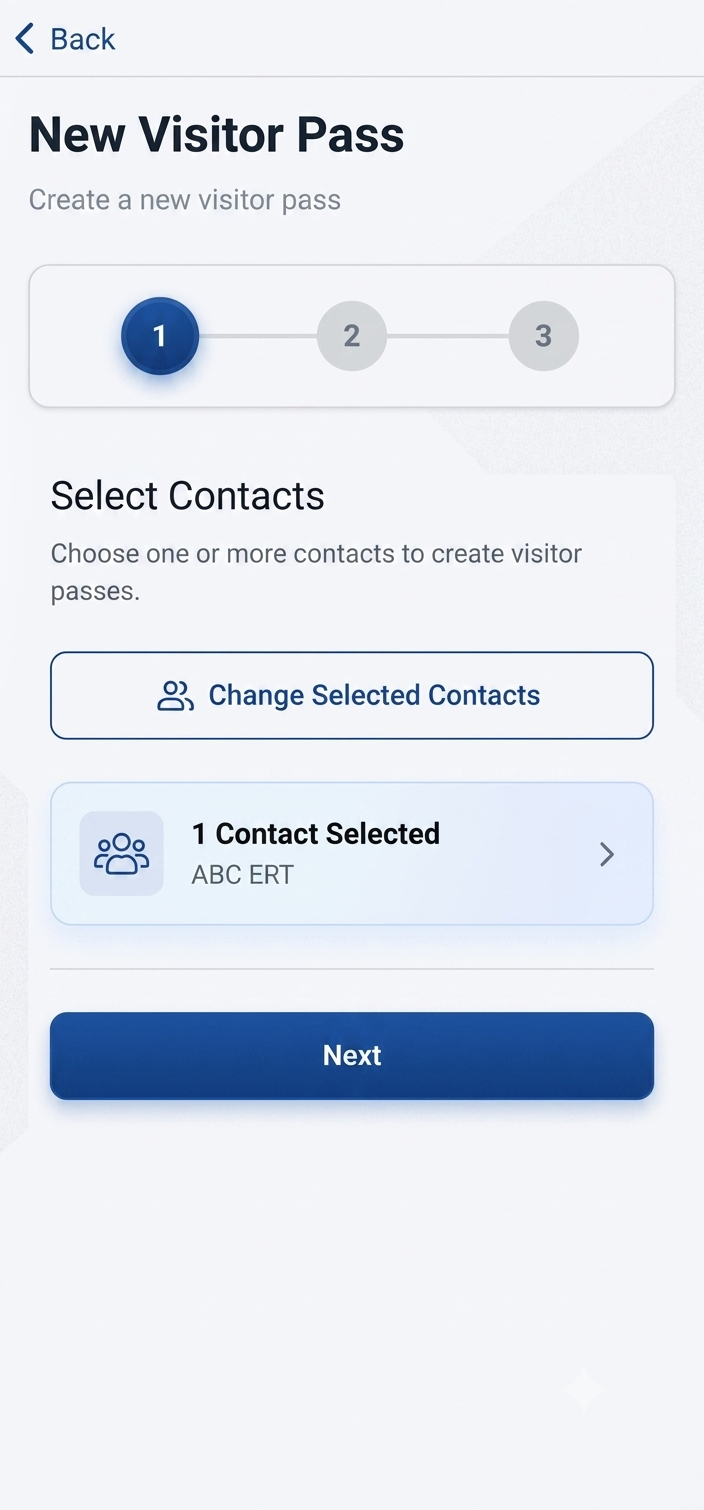
A resident or front-desk host opens the app and creates a visitor pass — name, purpose, and an approved arrival window.
Step 2 of 6
GuardWatch generates a unique QR code and the host shares it with the guest over WhatsApp, SMS, or however is easiest.
Step 3 of 6
The visitor arrives at the gate and shows the QR pass on their phone — no waiting for a resident to pick up a call.
Step 4 of 6
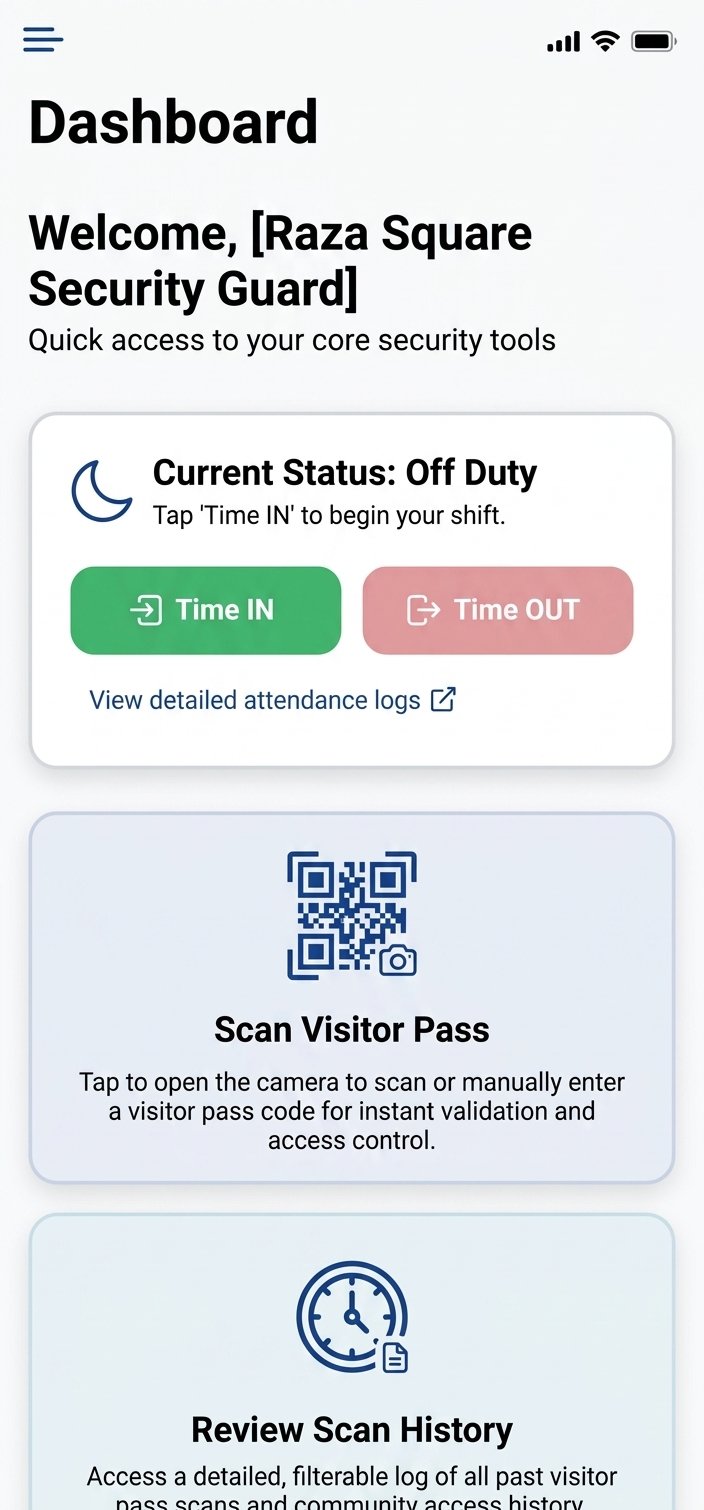
The guard opens the scan screen on the guard app and scans the QR. GuardWatch checks it against the approved pass instantly.
Step 5 of 6
The resident or host receives a real-time notification confirming their guest has been scanned in at the gate.
Step 6 of 6
The visit is written to the digital visitor register with a timestamp, host unit, and guard action — searchable later by anyone with access.
Product preview
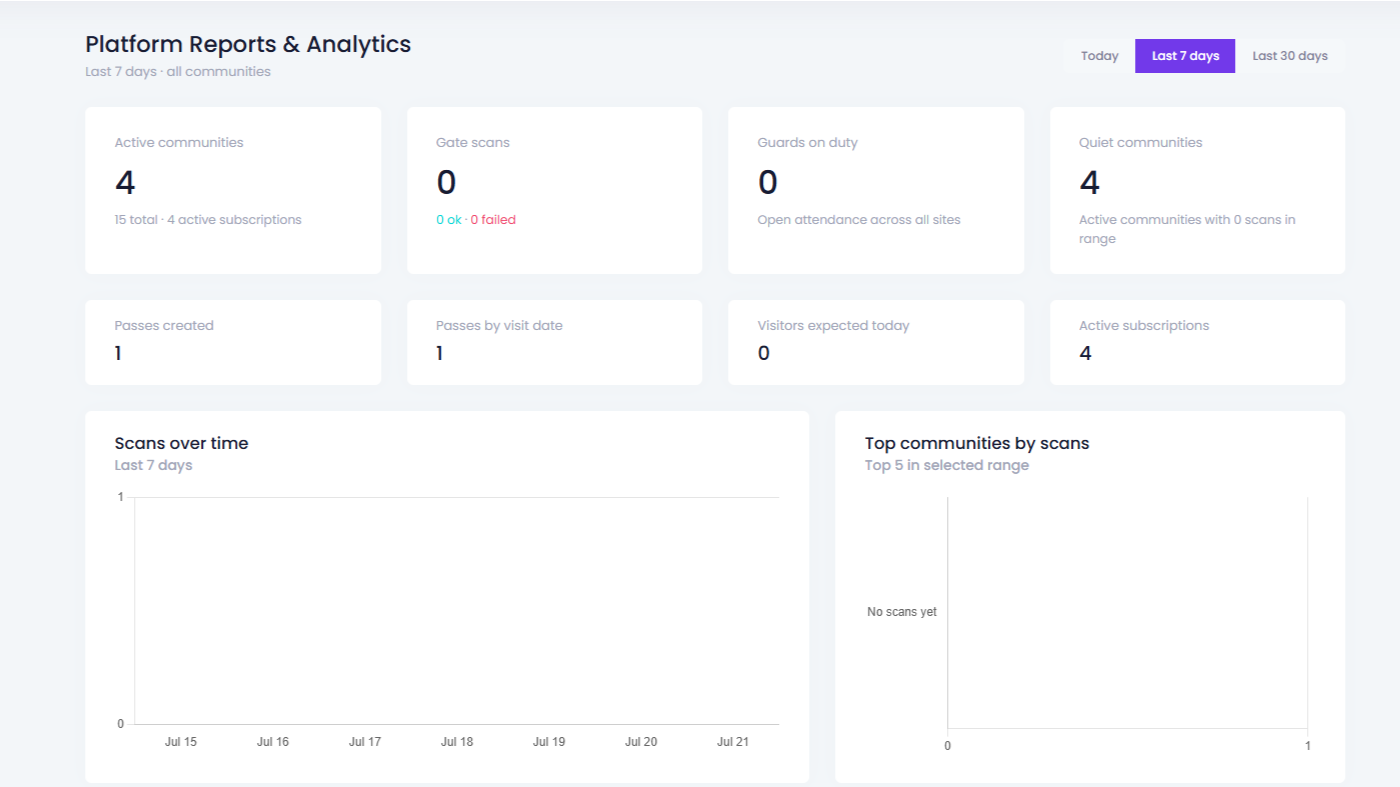
What residents, guards, and managers actually see — from pass creation to the entry log.
Outcomes
Outcomes for residents, guards, and the office — not a feature list.
Anyone can give a name at the gate and be waved through.
Every guest needs a valid QR pass tied to an approved host.
Know exactly who is inside your property, always.
Peak hours mean long lines while guards write and call.
Guards scan a QR instead of filling a register by hand.
Approved guests move through in seconds, not minutes.
Guards wait on phone calls that residents may not answer.
Hosts create and manage passes from their own phone.
Fewer call-ups, clearer control over who is expected.
Paper pages get lost, damaged, or simply thrown away.
Every scan is stored automatically, indefinitely.
Answer "who visited?" months later with confidence.
Residents find out a guest arrived only when the guard calls.
A notification fires the moment a pass is scanned.
Hosts always know when their guest is at the gate.
Committees and managers dig through paper stacks for answers.
Filter visitor history by date, unit, or guest in the dashboard.
Pull a complete visitor report in seconds, not hours.
Side by side
The same gate, measured against six things that actually matter.
| Capability | Paper register | GuardWatch |
|---|---|---|
| Entry speed | Handwritten, slow at peak hours | QR scan in seconds |
| Visitor verification | Verbal, unverifiable claims | Unique QR tied to a host approval |
| Resident involvement | A phone call for every guest | Pass created once in the app |
| Record keeping | Paper pages, easy to lose | Searchable digital visitor register |
| Reporting | Manual compilation by hand | Instant, exportable visitor logs |
| Audit trail | Incomplete and often illegible | Timestamped, permanent, per unit |
Getting started
Clear steps from your first demo to a gate that scans QR passes.
We walk through visitor entry for your specific gate, roles, and property layout.
We help configure your community or building, units, admins, and access rules.
Security staff learn QR scanning and how to confirm a pass at the gate.
Households or offices install the app and start creating their first passes.
Your gate runs digitally, with our team available by email, phone, and WhatsApp.
Timeline depends on property size and readiness. Ask on your demo how sites like yours typically go live, and see how housing societies specifically roll this out.
Common questions
Straight answers for admins, boards, and managers evaluating a QR visitor pass system.
A visitor management system is software that replaces the paper register at your gate. Instead of guests writing their name and destination by hand, a host creates a digital visitor pass, the guest receives a QR code, and the guard scans it at entry. Every visit is captured in a searchable digital visitor register instead of a notebook.
A resident or front-desk host creates a pass in the GuardWatch app for an expected guest. GuardWatch generates a unique QR code that can be shared instantly over WhatsApp or SMS. At the gate, the guard opens the scan screen and scans the code — GuardWatch confirms the guest, the host unit, and the approved time window before allowing entry.
No. Visitors only need the QR pass sent to their phone — as an image, a WhatsApp message, or an SMS link. They do not need to create an account or install anything. Only the host (resident or front-desk staff) and the guard need the GuardWatch apps.
A paper register depends on handwriting, memory, and guards being available to make phone calls. It cannot verify that a visitor is who they claim to be, and old pages are easy to lose or damage. A digital visitor register logs every scan automatically with a timestamp, host unit, and guard action — so records are complete, legible, and searchable months later.
Yes. Recurring guests — domestic staff, delivery riders, or regular vendors — can be saved as contacts so a new pass can be issued in seconds rather than re-entering details every visit. This keeps frequent, low-risk traffic moving quickly without lowering verification standards.
Most gates already have what they need: a smartphone running the GuardWatch guard app. There is no dedicated scanner hardware to buy. Ask during your demo whether a dedicated gate device makes sense for high-traffic entrances at your site.
Yes. Every scan is stored in the dashboard with visitor details, host unit, and timestamp. Admins and managers can filter by date, unit, or guest and pull records for board meetings, security audits, or incident reviews — without digging through paper stacks.
Visitor entry and guard operations are related but separate. This page covers QR visitor passes and digital visitor logs. For GPS tracking, patrol verification, and shift attendance, see our guard management tools — many communities run both from the same GuardWatch account.
Yes. The same visitor pass system works for apartment buildings and office receptions, not only large gated communities. Apartment visitor management typically adds a front-desk host who can create passes on behalf of a household, while offices use it to log client and vendor visits. The QR scan, host approval, and digital visitor register work the same way regardless of property type.